Showing posts with label ios. Show all posts

2014-08-06

SDK & Open Source used in my iOS project (2014)

In my recent iOS project, we have used a lots of open source code and SDK like many app do;

Here is the list of them:


  • CrashlyticsCrash Logging
  • Google Analytics: User Analytics: 
  • Parse: Push Notification Helper
  • EGORefreshTableHeaderView: PullToRefresh
  • SDWebImage: ImageView using URL
  • UIImage+ImageEffects: Making Blur Effect
  • UIImage+animatedGIF: Playing animated GIF in UIImageView
  • GCPlaceholderTextView: placeholder show in TextView
  • URBMediaFocusViewController: Enlarge the thumbnail image
  • YDSlider: Slider for audio player
  • JSONKit: JSON Helper
  • ASIHTTPLibrary: Asynchronous HTTP Request
  • TTAttributedLabel: Make UILabel having clickable link


Thanks for the developers of the above project! These save us a lot of time.

2014-07-09

Using AutoResize in iOS App Development

When programming the UI of an application, we are inevitable to program an UI with dynamic width and height;


Real Example:
A view contain a footer and content with different text length, some cause 1 lines, so cause 2 lines;


Dynamic Layout in iOS


There are several ways to handle this kind dynamic layout in iOS programming, one of my favourite is using "Auto Resize Mask", it help to adjust the size of the subview and help the subviews sticking to the four borders;


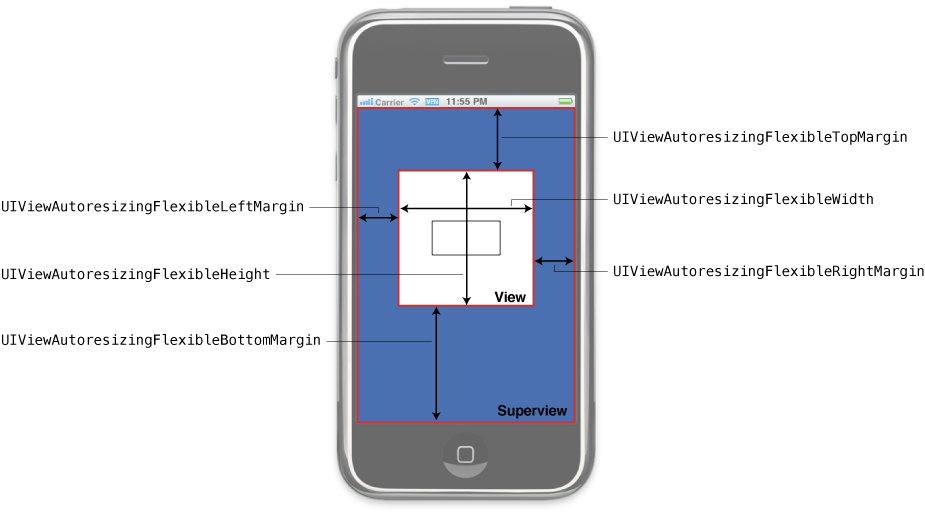
Autoresizing mask constants


Mask related to the auto size
UIViewAutoresizingFlexibleHeight
UIViewAutoresizingFlexibleWidth

Mask related to auto positioning
UIViewAutoresizingFlexibleLeftMargin
UIViewAutoresizingFlexibleRightMargin
UIViewAutoresizingFlexibleBottomMargin
UIViewAutoresizingFlexibleTopMargin

Also see: Diagram about the mask

Note: We don't need type those mask value, usually we work with the interface builder

Tips of using AutoResize


  1. Use with Interface Builder, you can preview the appearance on how it works.
  2. Uncheck the "AutoLayout" of your XIB in interface builder.
  3. Don't modify the size and position on views which are well "autosized", just modify the superview size.

Deal with Autoresize bugs

  • Find out which layout component are resize as you expect and double check the autoresize setting.
  • Check the adjusted size in the layoutSubview method.
  • Can use NSStringFromCGRect to convert the view.frame to String which is easy to print out.


Reference

Adjusting the Size and Position of Views at Runtime (Apple Doc)

2013-11-02

Fixing CCBReader problem for CCScale9Sprite

Today, when making some unit tests to check the behaviour of the CCBReader (CocosBuilder Reader); 
Found 2 issues when adding a CCScale9Sprite to the Interface;

1. Crash if the interface included a CCScale9Sprite Node:
https://github.com/cocos2d/CCBReader/issues/16

2. The CCScale9Sprite Node have a wrong opacity setting
https://github.com/cocos2d/CCBReader/issues/17

Hope this small pieces of information helps