2014-11-03

Four "C" of the Clean Code

Recently I am reading the book "Clean code" again. I have found there are 4 characteristics of the clean code. 

The 4 characters of the clean code should have:  
  • Controllable
  • Comprehensible
  • Convenient
  • Consistent 


Controllable


If there only just one concept to be remembered, it should be this one. 
If the program can be controlled by you, the author of the code or other who involved, this program will be a good program. 

For a controllable program, which is the program can be easily understood, changed, adding new features, and easy to debug. 
The more code involved, the more uncontrollable. It will become the "Gordian Knot.


Comprehensible:

Every program we write have two group of audiences; 
First is the machine, compiler, syntax checker, …., they will transfer our programs to executable;
Second is us, human being; The program should be readable so that we could understand and work on it. 
There are many chances that our programs will be read by someone else or yourself later. 
Therefore it is important to make the code comprehensible. 


Convenient:

While making a large program, we may involve a lots of code. Therefore, we need to arrange the code so that it helps to do thing fast. 

Here some examples:
- Find the libraries and functions available in the project and how to use it
- Quickly navigate to the class or method we want to go. 
- Easy to remember the classes involved

To do so, we need to adopt a good naming contention and code style.


Consistent

As we know, many words in English can refer to a similar meaning; One frequent met example in coding: number of X, count of X, size of X;  In order to prevent our code audience getting confused or mislead, we need to make sure the same word have the same meaning;
If you use "count" as the suffix telling how many, keep to use it over your class. 


2014-09-11

TDDccx3 1.1.0 - New Submenu UI developed.

The submenu of TDDccx3 is modified:


In the new design, we want to decrease the interference of the test components;
So the following changes are made
- Top toolbar is removed 
- Provide a Hide/Show button to hide/show the menu items
- Menu can be moved to wherever you want
- Toggle Stat is placed in the menu items;

The change is just made and not yet well test. It will be polished and tested soon. 

Available at:


2014-09-02

A day in my coding life.

Here is a short sharing of my daily coding life.

While arrived to office, prepare the basic first, breakfast, water and tea;

Then first thing first, I starts with a simple prayer and listening to biblical messages.

And then I read some industrial news from Twitter, Google Plus, Techcrunch, ... to get updated;

Next I prepare:
- Spotify (provide music for my concentration)
- Tomato.es (For Pomodoro Technique, one of time management skill)
- Trello (For task management)
- Evernote (for note taking and daily planning)

And then Tomato Clock starts, several 25 minutes session begin:

Every 25 minutes, I will focus on my different coding works:

  • Planning : Fail to plan, plan to fail. Always keep works being planned.
  • Program Design : Design is the origin, without a design, it will be very hard to code. 
  • Write and Run Code 
  • Refactor and Documentation : It help to re-organise what I have done
  • Sharing to other coders
  • Learn something new 
  • Testing : More test, more bugs unveiled and quality UP. 


While my team members are all there, we start the daily SCRUM to update the progress of each others.

A day of coding if full of fun and challenges !!!

Wish you enjoy your work and coding as well.


2014-08-06

SDK & Open Source used in my iOS project (2014)

In my recent iOS project, we have used a lots of open source code and SDK like many app do;

Here is the list of them:


  • CrashlyticsCrash Logging
  • Google Analytics: User Analytics: 
  • Parse: Push Notification Helper
  • EGORefreshTableHeaderView: PullToRefresh
  • SDWebImage: ImageView using URL
  • UIImage+ImageEffects: Making Blur Effect
  • UIImage+animatedGIF: Playing animated GIF in UIImageView
  • GCPlaceholderTextView: placeholder show in TextView
  • URBMediaFocusViewController: Enlarge the thumbnail image
  • YDSlider: Slider for audio player
  • JSONKit: JSON Helper
  • ASIHTTPLibrary: Asynchronous HTTP Request
  • TTAttributedLabel: Make UILabel having clickable link


Thanks for the developers of the above project! These save us a lot of time.

2014-07-13

TDDLib (cocos2d-x 3) updated: Improved UI

My TDD Testing framework for cocos2d-x 3.0 is updated.


Changes:
- Modified UI
- Filter test without the need to touch the "Find" button
- Add Background colour setting (help to check coloured elements)

Source: https://github.com/tklee1975/tddlib_cocos2dx3

2014-07-11

Fixing undesired outline of Label in cocos2d-x 3.0

Recently, when I work on my TDDLib project, I found that the Label of cocos2d-x 3.0 show the Label with an undesired outline which isn't I want to (The first label shown below).


After several google search, I found the solution to fix it (The second label shown above).

It's simple, just call the blend of the Label to BlendFunc::ALPHA_PREMULTIPLIED.
Code: label->setBlendFunc(BlendFunc::ALPHA_PREMULTIPLIED

Source example:
std::string sysFont = "GillSans";

std::string test1 = "No BlendFunc";
std::string test2 = "ALPHA_PREMULTIPLIED";

Label *label;
Color3B textColor = Color3B(200, 245, 245);

// First Label (Undesired outline)
label = Label::createWithSystemFont(test1, sysFont, 40);
label->setColor(textColor);
label->setPosition(Point(250, 300));
addChild(label);

// Second Label (Fixed outline)
label = Label::createWithSystemFont(test2, sysFont, 40);
label->setColor(textColor);
label->setPosition(Point(250, 200));
label->setBlendFunc(BlendFunc::ALPHA_PREMULTIPLIED);

addChild(label);


2014-07-09

Using AutoResize in iOS App Development

When programming the UI of an application, we are inevitable to program an UI with dynamic width and height;


Real Example:
A view contain a footer and content with different text length, some cause 1 lines, so cause 2 lines;


Dynamic Layout in iOS


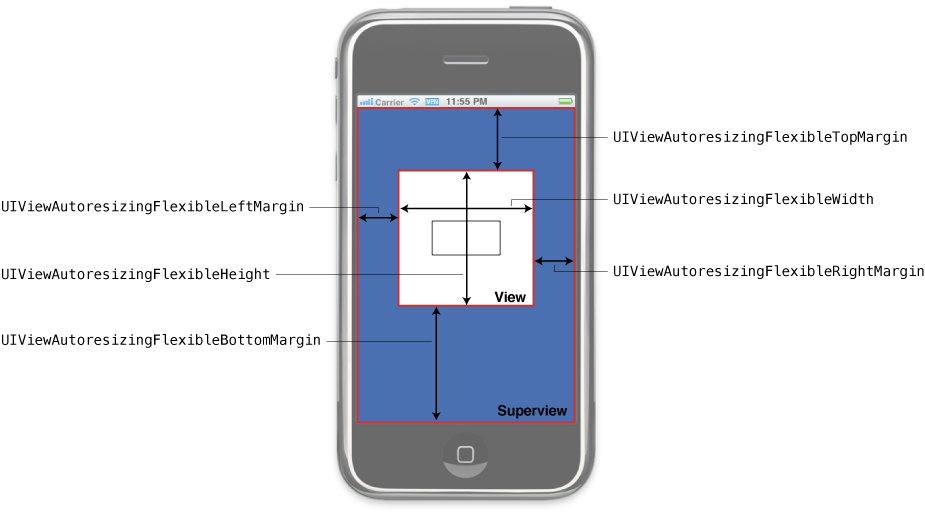
There are several ways to handle this kind dynamic layout in iOS programming, one of my favourite is using "Auto Resize Mask", it help to adjust the size of the subview and help the subviews sticking to the four borders;


Autoresizing mask constants


Mask related to the auto size
UIViewAutoresizingFlexibleHeight
UIViewAutoresizingFlexibleWidth

Mask related to auto positioning
UIViewAutoresizingFlexibleLeftMargin
UIViewAutoresizingFlexibleRightMargin
UIViewAutoresizingFlexibleBottomMargin
UIViewAutoresizingFlexibleTopMargin

Also see: Diagram about the mask

Note: We don't need type those mask value, usually we work with the interface builder

Tips of using AutoResize


  1. Use with Interface Builder, you can preview the appearance on how it works.
  2. Uncheck the "AutoLayout" of your XIB in interface builder.
  3. Don't modify the size and position on views which are well "autosized", just modify the superview size.

Deal with Autoresize bugs

  • Find out which layout component are resize as you expect and double check the autoresize setting.
  • Check the adjusted size in the layoutSubview method.
  • Can use NSStringFromCGRect to convert the view.frame to String which is easy to print out.


Reference

Adjusting the Size and Position of Views at Runtime (Apple Doc)